

November 9, 2026
Preparing for Hajj involves spiritual readiness as well as practical planning. If you are travelling from Canada, one of the first online tasks you may encounter is creating a Nusuk Hajj account. It is worth understanding what the account does, which documents you may need and how to avoid simple errors before you begin.
This guide walks Canadian Muslims through the general account-creation and document-preparation process, including passport uploads and personal photographs. The Nusuk website and requirements can change between seasons, so always follow the live instructions for your country and the relevant Hajj year.
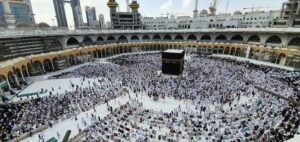
Nusuk Hajj is a digital platform overseen by Saudi Arabia’s Ministry of Hajj and Umrah. It is designed for pilgrims from countries served by the platform, giving eligible applicants access to Hajj information, authorised service providers, packages and the official booking process.
A Nusuk Hajj account is your personal access point for the steps that may follow registration. Depending on the arrangements for your country and season, these can include uploading documents, completing an application, receiving verification updates, reviewing package categories and proceeding with a booking.
It is important to separate account creation from acceptance for Hajj. Creating a profile or submitting details does not mean you have been approved, allocated a place or booked a package. The platform itself explains that registration is an initial stage and that package availability and reservations are handled later.
For Canadian residents, the first question is whether Canada is included in the countries served for the season you intend to travel. The list and process can change each year. Check the current country options and instructions on the official Nusuk Hajj website before entering personal information.
A little preparation can make the online process easier, especially if you are helping a parent, spouse or another family member.
The current Nusuk sign-up page asks applicants to select their country of residence from the list of countries served for the relevant Hajj season. It also provides an option for people who cannot find their country in the list.
Do not select a country simply because you hold its passport, have family there or plan to depart from its airport. Read the wording carefully: country of residence and nationality are not always interchangeable. If you live in Canada but hold another passport, or live outside Canada as a Canadian citizen, check the instructions for your particular circumstances.
If Canada is not shown, do not choose a different country to get past the page. Use the platform’s official assistance route and ask which process applies to you. Avoid relying on social media comments or unofficial agents for eligibility decisions.
The current Nusuk Hajj account creation page begins with an email address and consent to the platform’s terms and privacy policy. It also offers an option to subscribe to email updates.
Use an address that belongs to you or that you can access consistently. Check that it is typed correctly and that the inbox has room to receive messages. If you use a shared family email, make sure you can identify which pilgrim an update relates to.
After submitting the initial form, follow the instructions shown on screen. The platform may send a verification message or ask you to complete further steps. Check your spam or junk folder if an expected message does not appear, but do not repeatedly submit new accounts while waiting.
Your passport should be current, undamaged and ready for international travel. Check the expiry date and make sure the personal information is accurate.
If you need to renew a Canadian passport, consult the Government of Canada’s passport renewal guidance for eligibility, documents, photo rules and processing information.
Do not assume that a passport that remains valid today will meet the entry requirements at the time of Hajj. Saudi entry and visa rules can change, so check the latest official requirements before booking or travelling.
The exact screen layout may change, and the current sign-up page may display information for a different Hajj season. Use the steps below as a guide to the general process, not as a promise that every field or button will appear exactly as described for Hajj 2027.
Type the official address into your browser: hajj.nusuk.sa. Check the spelling and make sure the address uses HTTPS and ends in .sa. The official site identifies itself as a Saudi government platform.
Be cautious with sponsored search results, social media links, forwarded messages and websites that imitate the Nusuk name. Do not upload a passport, photograph or other identity document to a page unless you have confirmed that it is the official platform.
It is safer to bookmark the official page once you have checked it. Use that saved page whenever you return to sign in.
Select the country that matches the platform’s instructions and your actual residence situation. Read any confirmation statement before proceeding.
If you are a Canadian resident, look for Canada in the current list. If it is missing, use the option indicating that you cannot find your residence country and follow the guidance provided. Do not select the United States or another country just because you plan to fly from there.
This step matters because eligibility and the registration route may be country-specific. If you are unsure whether your citizenship, permanent-resident status or current address determines the correct selection, ask Nusuk support before submitting.
Type your email carefully, checking for spelling errors and unnecessary spaces. Use an address you can access without relying on someone else to forward important messages.
Read the terms and conditions and privacy policy before giving consent. The page may also offer an email subscription for updates. Consider opting in if you want to receive official platform announcements, then select the account creation option shown on screen.
Follow the instructions sent to your inbox, if verification is requested. Open the message and use the official verification link or code as directed. If you do not receive anything, check junk mail and confirm that the address entered was correct.
Do not share a one-time password, verification code or login link with an unknown person. A genuine support representative should not need you to disclose your password.
If the next screen asks you to create a password, follow the platform’s displayed rules. Use a unique password that you do not use for banking, email or other accounts. A password manager can help you store it securely.
Once the account is created, keep a note of the email address used. Your Nusuk Hajj login may be needed repeatedly for document submission, application updates and later booking stages.
Document uploads are an area where applicants can lose time. The platform’s upload instructions are the final authority because accepted formats, dimensions and file-size limits may be updated. Do not rely on image specifications copied from an older season or another country’s guide.
Official Saudi Hajj guidance lists a passport copy among the documents pilgrims should prepare. When the upload stage appears, use the exact passport page or pages requested by Nusuk.
Before you upload your passport to Nusuk, check that:
Place the passport on a flat surface in good light and take a straight, clear image if the platform accepts a photograph. Avoid cropping the page tightly or editing the image in a way that changes its appearance. If you scan it, check the saved file before uploading.
Official Saudi Hajj guidance advises preparing a passport-sized personal photograph with a white background. However, the exact Nusuk registration photo requirements for Canadian applicants in 2027 must be confirmed in the live upload guide. Do not assume that Canadian passport photo dimensions automatically match the Nusuk profile photo specifications.
For a suitable photo, prepare a recent, clear image with your face visible, a plain white background and even lighting. Avoid filters, portrait effects, heavy retouching, distracting backgrounds or accessories that obscure your face. Follow the platform’s instructions about head coverings and other appearance requirements; do not rely on guesses where the official guide is specific.
If the page lists a required pixel size, file format or maximum file size, adjust the image to those exact limits. A photo can look clear on your phone but still be rejected if the file is too large or the dimensions are wrong.
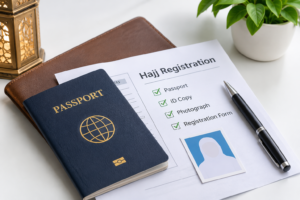
Some registration routes may request proof of legal residence in addition to a passport. This is particularly relevant when the platform’s country eligibility rules distinguish between citizenship and residence.
Only upload a residence document if the official form requests it. Check the accepted evidence and whether the document must show your name, address, validity dates or another detail. Canadian documents should be current and legible. If the platform does not explain which evidence it accepts, contact Nusuk support rather than uploading several unrelated documents.
A careful review before submission can prevent avoidable delays.
Choosing the wrong country: Do not confuse citizenship, residence and departure airport. Follow the field label and official eligibility instructions.
Using someone else’s email: This can make verification and later account recovery difficult. Use an address you can access.
Uploading a cropped passport: Make sure the full requested page is visible and the details can be read.
Using an unsuitable photograph: A coloured or busy background, low resolution, shadows or incorrect file dimensions may lead to rejection. Follow the live photo guide.
Entering details differently from the passport: Use the same spelling and order of names as the identity document unless the platform gives specific instructions for a field.
Creating duplicate profiles: If you have already registered, use the login or account-recovery option instead of starting again. If you believe a duplicate has been created, ask official support how to resolve it.
Assuming account creation confirms Hajj: An account is only an early step. Application verification, eligibility, package selection, payment and booking are separate stages.
Paying someone who promises access: Never send money to an unofficial person who claims they can activate your profile, bypass the platform or guarantee a Hajj place. Follow payment instructions only when they appear through the official process.
After account creation, the platform may direct you to upload documents and complete your pilgrim application. The official Nusuk Hajj overview describes the wider journey as account creation, document upload, application completion, verification, category selection, e-wallet funding, service-provider browsing, package selection, booking and itinerary review.
These stages may not all be available at the same time. Some options appear only after the relevant application has been reviewed or when bookings open for an eligible country.
Keep checking your account and official email updates. If a document is rejected, read the reason carefully and replace it with a corrected file rather than uploading the same image repeatedly. Save confirmation messages and application references.
If you are preparing with family members, check how companions or linked applications are handled for the relevant season. Do not assume that one person’s completed account automatically registers everyone else.
Before you finish, use this quick checklist:
The account creation page does not present account creation as a paid service. Package costs and any payment stages are separate and should only be reviewed through the official platform when available.
You can check the official sign-up page from Canada, but the available country list and eligibility rules determine the route you can use. Confirm that Canada is served for the relevant Hajj season before proceeding.
Saudi Hajj guidance refers to a passport-sized personal photo with a white background. Follow the exact file format, dimensions and size limits shown in the current Nusuk upload instructions.
Check that you are using the correct email address and official login page. Use the account-recovery option if available. Avoid creating a second profile unless official support advises you to do so.
No. Account creation does not mean that your application has been verified or that a package has been booked. You must complete the applicable official steps and meet the season’s requirements.
Creating a Nusuk Hajj account is an important early step, but accuracy matters more than speed. Check the country selection, use an email address you can access, prepare clear passport and photo files, and follow the instructions displayed for the relevant season. Most importantly, use only the official platform for registration and booking.
If you are preparing for Hajj 2027 and would like help understanding the travel arrangements, Aalia Travels in Scarborough can provide information about its pre-registration support and available services. You can register your interest for Hajj 2027 or contact the Aalia Travels team with questions. Agency guidance can support your planning, while official account registration and Hajj booking remain subject to Nusuk’s process.